The truth about disk space
Allocated size is the default, so sparse files, hardlinks, and macOS volume layout do not distort the result.
 Storage Map
Native for Apple Silicon
Storage Map turns your disk into a clear, live map — with the macOS details other analyzers miss and the safety a cleanup tool needs.
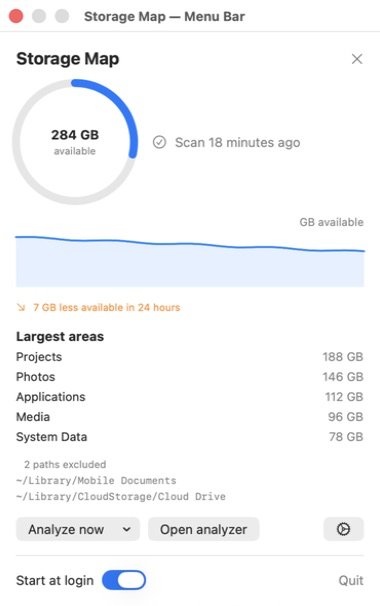
Explore, understand, reclaim
See the largest areas first, switch between allocated and apparent size, then move through the map at your own pace.
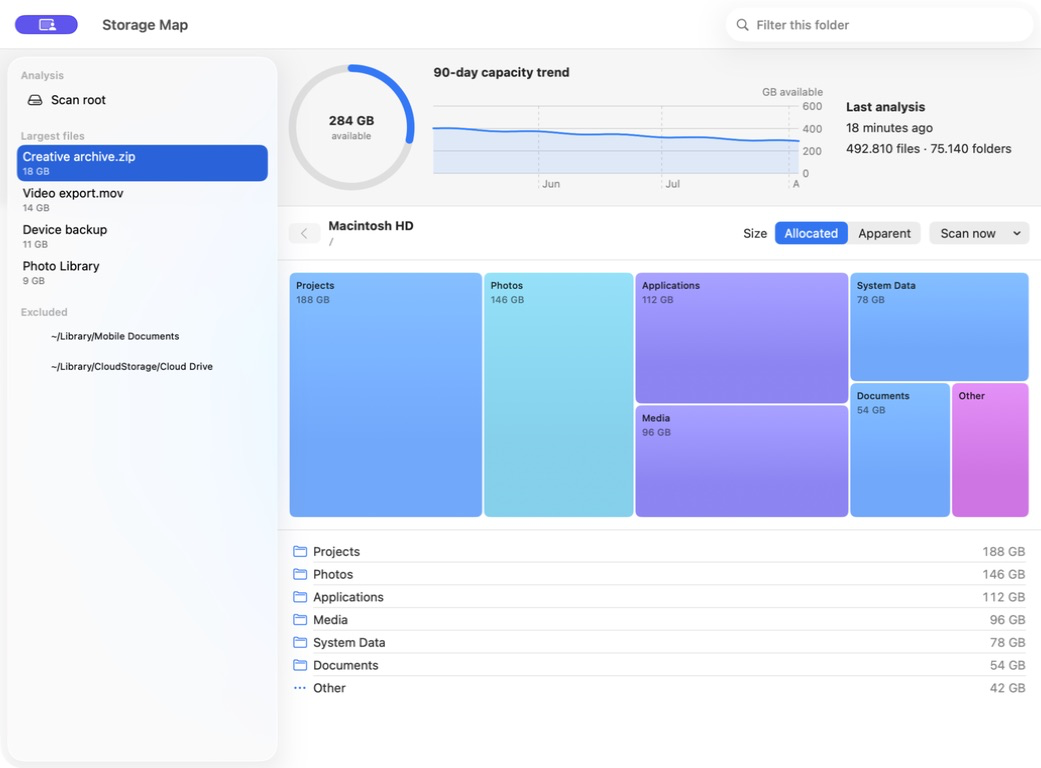
Marketing previews use synthetic data. No real Mac, username, path, or storage value is shown.
Designed for the job
Allocated size is the default, so sparse files, hardlinks, and macOS volume layout do not distort the result.
Move from a system-wide treemap into folders and files without losing context or waiting for a second interface.
The menu bar watches capacity, remembers 90 days, and schedules full scans around power and thermal conditions.
Use Finder, Trash, or typed-confirmation deletion. Protected roots and changed file identities stay locked.
Private by architecture
The scanner runs entirely on your Mac. Storage Map has no account, analytics SDK, ad identifier, or server to receive your paths. Full scan trees disappear from memory when the analyzer closes.
One scanner, two interfaces
The standalone CLI shares the same Rust engine and macOS correctness rules with the app. Use the TUI, print a top list, or exclude cloud roots explicitly.
$ storage-map / --exclude-cloud

Scanning Macintosh HD
492,810 files  ·  75,140 folders
716 GB allocated

188 GB  /Users/…/Projects
146 GB  /Users/…/Pictures
112 GB  /Applications
 96 GB  /Users/…/Media
Same price, your choice
Both editions cost €9.99 once. Pick the App Store for the simplest installation, or buy direct when you also want the command-line interface.
For a familiar purchase, one-click installation, and automatic delivery of Store updates.
For the complete direct package, signed and notarized for a safe installation outside the Store.
Each purchase applies to its selected distribution channel. €9.99 is the one-time total price; required tax information is shown before payment.
The useful details
macOS protects app data, Mail, Messages, and other locations. Full Disk Access lets a system-wide scan include those areas. Capacity monitoring and partial scans work without it.
No. TCC permissions belong to the terminal application that launches the CLI; sudo does not bypass them.
Provider-managed folders can block while macOS downloads metadata or content. Each detected provider is visible and can be included when you want it.
No. App Store apps must be self-contained and cannot install a binary into /usr/local/bin. Choose the equally priced Direct Edition when you want the CLI.
You are choosing a distribution method, not a quality tier. The App Store Edition favors Store installation and updates; the Direct Edition includes the CLI and uses our signed Installer Image.
Understand before you delete
Practical Mac storage guides and fair comparisons, written around the accounting details that change what a disk total really means.
Trace a full startup disk from the category chart to the real folders behind it.
Read moreFind the underlying files without treating a broad macOS category as disposable junk.
Read moreSee how a native Mac treemap compares with the familiar Windows folder-first workflow.
Read more